GA4 & Conversion Tracking for Google Ads
Every bidding decision in this cluster assumes the conversion data underneath it is trustworthy. April 2026 was the moment that assumption got tested for a lot of accounts.
Rohan Alexander · 11 min read · Updated July 2026
Quick Answer
Why GA4 and Google Ads Rarely Match Exactly
| Source of mismatch | Why it happens |
|---|---|
| Processing speed | Google Ads often reports within hours; GA4 can take 24-48 hours to fully process |
| Attribution model differences | The two platforms don't necessarily weight touchpoints identically |
| Time zone settings | Inconsistent time zone configuration between the two accounts skews daily comparisons |
| Duplicate or misconfigured events | A trigger firing twice, or tracking a pageview instead of an actual form submission, adds noise before attribution even becomes the question |
The two platforms answer different questions rather than needing to agree — GA4 shows how channels work together across a customer's broader journey, while Google Ads stays focused specifically on ad performance within its own ecosystem. Forcing them to match perfectly is usually less useful than understanding how each distributes credit and using both for what they're actually good at.
What the April 2026 GA4 Update Actually Changed
This was a more disruptive release than a typical GA4 update — Google restructured the Advertising section, consolidating several reports and changing how attribution models are surfaced and compared, moved the model comparison tool, and changed the default attribution window. The practical effect for Google Ads advertisers: Smart Bidding algorithms relying on GA4-imported conversions may now be working with meaningfully different underlying data and attribution logic than they were before the update, whether or not anyone on the team explicitly changed a setting. Any account importing GA4 conversions into Google Ads that hasn't been re-audited since this update should be treated as a priority check, not a someday task.
Data-Driven Attribution: The Volume It Actually Needs
Data-driven attribution (DDA) — Google's default, algorithmically-weighted model — needs a meaningful volume of data to work reliably, commonly cited thresholds being around 400+ conversions for a specific key event and roughly 20,000 total qualifying sessions at the property level. Below these thresholds, the model has too little data to distinguish genuine attribution patterns from noise, and GA4 may fall back to a simpler default model without this being obvious unless it's specifically checked. Confirm current eligibility for your property directly rather than assuming DDA is fully active just because it's the default option shown.
Enhanced Conversions and Why It Matters More Now
Enhanced Conversions sends hashed first-party customer data (email, phone number) alongside a standard conversion tag, improving Google's ability to match a conversion back to the specific ad click that produced it — particularly valuable as browser-level privacy restrictions continue to limit how much can be inferred from cookies alone. This isn't just a nice-to-have accuracy improvement; it directly affects how much real signal Smart Bidding algorithms have to optimize against, and is frequently listed as a genuine prerequisite for testing newer automation features like AI Max for Search reliably.
Per-Conversion Attribution Settings
A meaningful recent change: conversion attribution settings can now be adjusted independently for each individual conversion action, rather than one attribution model applying uniformly across an entire account. This addresses a common historical source of Google Ads vs GA4 discrepancy, since different conversion types (a purchase vs a newsletter signup, for instance) can reasonably warrant different attribution logic — but it also means an account's attribution setup now needs deliberate, conversion-by-conversion review rather than a single account-wide setting checked once.
Auditing Your Setup After a Platform Update
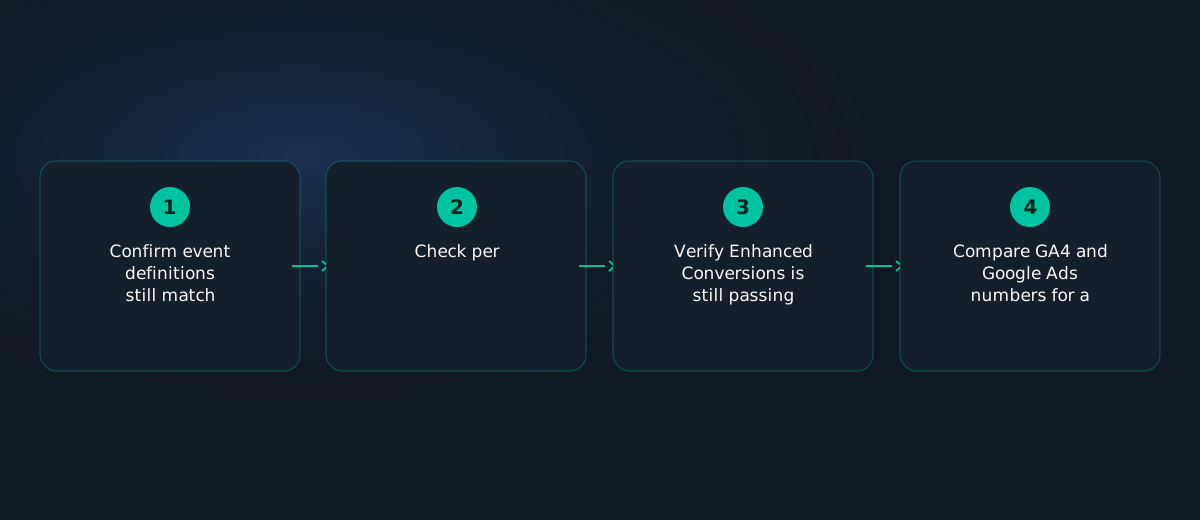
- Confirm event definitions still match expectations — a platform update can quietly change what counts as a specific event.
- Check per-conversion attribution settings individually rather than assuming an old account-wide setting still applies uniformly.
- Verify Enhanced Conversions is still passing data correctly — a site change unrelated to tracking can sometimes break this silently.
- Compare GA4 and Google Ads numbers for a recent, fully-processed period, expecting reasonable but not exact alignment, and investigating only meaningful, sustained gaps.
Variations by Business Type
| Business type | Tracking priority |
|---|---|
| Ecommerce | Purchase event accuracy and Enhanced Conversions are the highest-leverage checks |
| Lead generation | Per-conversion attribution matters especially where lead quality varies by source |
| Multi-touch, longer sales cycle | DDA volume thresholds are harder to hit — consider a longer attribution window and realistic expectations about model reliability |
Case Study
An ecommerce account's Smart Bidding performance quietly degraded over several weeks following the April 2026 GA4 update, with no obvious cause visible in Google Ads reporting alone. An audit of the GA4 configuration found that a key purchase event's attribution setting had reverted to a default that no longer matched the account's actual sales cycle, following the platform restructuring. Correcting the per-conversion attribution setting and re-verifying Enhanced Conversions data flow restored bidding performance within roughly two weeks — the underlying campaigns and creative had never actually been the problem.
Decision Matrix
| Situation | Priority |
|---|---|
| Bidding performance degraded with no clear campaign-level cause | Audit GA4 tracking and attribution settings before assuming it's a bidding or creative issue |
| Haven't reviewed GA4 setup since April 2026 | Run the audit process above as a priority, not a someday task |
| Conversion volume too low for reliable DDA | Consider a simpler attribution model or extending the measurement window |
Common Mistakes
- Assuming GA4 and Google Ads should match exactly, and troubleshooting a non-problem.
- Not re-auditing tracking configuration after a major platform update.
- Applying one attribution model account-wide instead of reviewing it per conversion type.
- Skipping Enhanced Conversions, quietly starving Smart Bidding of signal.
Troubleshooting
Smart Bidding performance degraded with no clear cause: audit GA4 tracking and attribution settings before assuming the issue is with campaigns, creative, or bids.
GA4 and Google Ads numbers look meaningfully different, not just slightly off: check time zone consistency and duplicate event firing before concluding it's a genuine attribution disagreement.
Checklist
☐ GA4 setup re-audited since the April 2026 update
☐ Per-conversion attribution settings reviewed individually, not assumed account-wide
☐ Enhanced Conversions enabled and verified still passing data
☐ Time zone settings consistent between GA4 and Google Ads
☐ DDA eligibility confirmed directly, not assumed from the default view
AI Prompts to Speed This Up
- "Walk me through auditing my GA4 conversion tracking setup for Google Ads after a platform update, step by step."
FAQ
Why don't GA4 and Google Ads conversion numbers match?
Different attribution logic, processing speed, and possible time zone or duplicate-event issues — some gap is expected, not necessarily a sign of a problem.
What changed in the April 2026 GA4 update?
Google restructured attribution reporting and conversion management, including default attribution window changes — a structural change, not a cosmetic one.
What does data-driven attribution need to work well?
Commonly cited thresholds are 400+ conversions per key event and roughly 20,000 qualifying sessions.
What is Enhanced Conversions and why does it matter?
It sends hashed first-party data alongside conversions, improving match accuracy and giving Smart Bidding more signal to learn from.
A platform update that quietly degrades your tracking looks identical to a bidding problem — until someone checks.
Zephra re-verifies conversion tracking and attribution configuration automatically whenever a major platform change is detected, catching the real cause before it's misdiagnosed as a campaign issue.
Start Free Audit →Sources & Further Reading
- Google Analytics Help — About Attribution Models — Official documentation on GA4 attribution modeling and data-driven attribution requirements.
- WordStream — 2026 Google Ads Benchmarks Report — Current cross-industry CPC, CTR, and conversion rate benchmarks.
Attribution thresholds and update details referenced in this guide reflect 2026 reporting as of publication — confirm current requirements directly in Google Analytics and Google Ads before making tracking decisions.